
Introduction
Every developer running 5+ sites has the same 8 to 15 questions a week:
- Which CP held the most units yesterday across all sites?
- Why did Friday's 12 site visits not convert?
- What is our cash position across the 7 SPVs right now?
- Which towers have inventory under 20% available?
- Which supervisor reported a slip on the WhatsApp group this week?
Today the answer takes three phone calls, an Excel pull from the CRM, and one accountant's afternoon. By the time it lands on the owner's desk, the question has moved on. The decision that should have been data-backed gets made on instinct, on the call, on whoever shouted loudest in the WhatsApp group.
This is not a software problem. The data exists - spread across Sell.do or LeadRat for sales, Tally per SPV for finance, an inventory module for units, and the dozen WhatsApp groups where CPs and site teams actually live. The problem is that nobody is reading all four at once and surfacing the WHY.
What follows is the playbook - 10 specific workflows the owner already wants and can have automated, with every digest and every answer coming with an explanation attached.
How the WhatsApp + CRM + Tally read model works
Before the 10 workflows, the mechanic. Four steps that repeat across every workflow below.
- Name the channels. Which WhatsApp groups to monitor (CP master group, site-1, site-2), which CRM (Sell.do / LeadRat / custom), which Tally companies (one per SPV), and any other systems on your stack.
- KolossusAI reads continuously. Read by default across WhatsApp Business API, CRM database or API, Tally per SPV, and any custom modules. Automated replies on WhatsApp (acknowledge a hold, nudge a CP whose hold is ageing past 48 hours, push a brochure on first inquiry) are opt-in per workflow rule you configure. Nothing fires automatically until you turn that rule on - until then, CPs and brokers see no change to the groups.
- You ask, or you schedule. Two surfaces: on-demand plain-English questions (ask anything, get an answer + WHY) and scheduled digests (8:30 pm daily summary to email + WhatsApp, configurable per role).
- Every answer ships with a WHY. Not just the number. One paragraph explaining the pattern, the cause, and what is worth doing next. This is the difference between a dashboard and a daily briefing.
Total elapsed time from connection to first digest: under one day. The first digest arrives on the evening you connect.
The 10 workflows
Grouped by function. Each workflow gets the plain-English question you would ask, the decision it unlocks, what happens manually today, and what KolossusAI delivers.
WhatsApp ops monitoring
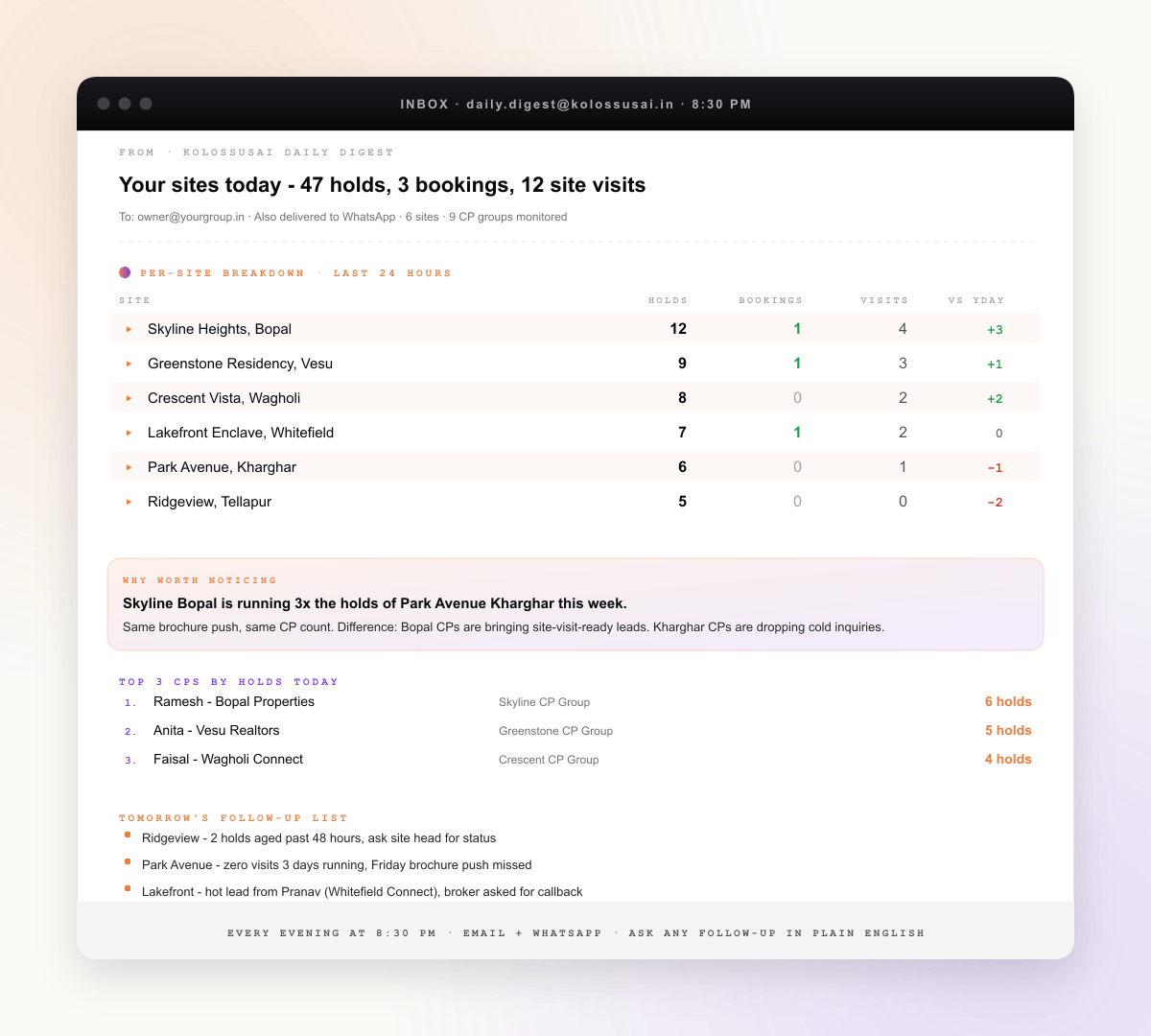
3 workflowsWhat you configure: "Send me a summary of all activity in our 8 CP WhatsApp groups every day at 8:30 pm to email and WhatsApp". Unlocks the evening review without opening 10 group chats. Manual today: owner scrolls through groups for 30 to 60 minutes, misses 40% of the signal. With KolossusAI: structured digest - holds today by site, new hot leads, CP activity ranking, plus a one-paragraph WHY worth noticing.
What you would ask: "Show me every unit on hold across all sites right now, with the CP and customer name". Unlocks the call where you decide whether a hold is real or expiring. Manual today: site-by-site phone calls and inventory module cross-checking. With KolossusAI: live view pulled from monitored WhatsApp messages, drillable to the original message, with hold-age and CP credibility score attached.
What you would ask: "Top 20 CPs by conversion rate this month - holds raised vs units actually booked". Unlocks the commission rationalisation conversation and the "which CPs do we double down on" decision. Manual today: rarely run because the data sits in two systems. With KolossusAI: weekly ranking with a WHY paragraph - which CPs are bringing real intent vs speculative holds.
CRM insights with the WHY
3 workflowsWhat you would ask: "Why did Friday's 12 site visits not convert?". Unlocks the Monday review with insight, not just numbers. Manual today: sales head pulls a list, owner guesses the why. With KolossusAI: the list plus a WHY paragraph - source mix, time of visit, sales-team assignment, follow-up gap. The explanation is the differentiator.
What you would ask: "Which lead sources are converting best this quarter, and why?". Unlocks the marketing budget reallocation conversation. Manual today: analyst exports CRM data, builds a pivot, takes a guess at why. With KolossusAI: ranked sources with an explanation - which leads are warm vs cold, how the follow-up cycle differs, where intent breaks down.
What you would ask: "Which CPs are bringing leads that convert, and what does each cost us per booking after commission?". Unlocks the "who do we invest in" CP-tier decision. Manual today: commission accruals tracked in one sheet, conversion in another, never joined. With KolossusAI: per-CP economics with the WHY - which CPs are sending already-qualified buyers vs which are pumping speculative holds.
Cross-site live operations
2 workflowsWhat you would ask: "Show me unit status across all 7 projects - sold, on hold, available - right now". Unlocks the daily owner morning ritual without phone calls. Manual today: each site sales-head shares a screenshot, owner stitches them in his head. With KolossusAI: live cross-site view, drillable to per-tower, per-floor, with hold-age and last-update timestamp.
What you configure: "Summarise site-team WhatsApp activity per project every evening - photos, slab pours, vendor arrivals, issues raised". Unlocks the project-head review without scrolling 300 photos. Manual today: reviewed sporadically, patterns missed. With KolossusAI: structured digest with photo summaries, vendor counts, issue categories, and a WHY line on what is slipping.
Compliance and group finance
2 workflowsWhat you would ask: "Prepare the RERA Q-update data for project X in our state's format". Unlocks a CA review hour instead of a week of data wrangling. Manual today: finance team spends 5 to 8 days per quarter pulling from CRM, escrow statements, Tally per SPV. With KolossusAI: auto-pulled data aligned to your state's RERA format, with drill- down to source. CA reviews and uploads to the portal; portal upload stays human.
What you would ask: "Group P&L across all 7 SPVs for the last quarter, drillable by project". Unlocks the board meeting that does not need a week of preparation. Manual today: CFO consolidates manually, charts of accounts drift between entities. With KolossusAI: live consolidation with a unified chart of accounts, plus a WHY paragraph on which project is the margin leader and which is bleeding.
One week with the playbook
The reason the playbook lands harder than it should: it runs end-to-end in one week.
- Monday - kickoff call. 30-minute session with a founder. We connect Sell.do (or LeadRat, or your custom CRM), one CP WhatsApp group, and one Tally SPV. First plain-English question runs live on the call.
- Monday evening - first digest. 8:30 pm. Email arrives. Subject line: "Your sites today - 47 holds, 3 bookings, 12 site visits". Per-site breakdown, a CP ranking, and a WHY worth noticing paragraph.
- Tuesday to Thursday - expand coverage. Owner adds remaining CP groups, finance head connects the other 6 Tally SPVs, sales head adds inventory module. Coverage grows from 1 site to all 7.
- Friday - first plain-English question session. Owner asks the queue of questions he has been mentally saving. Each answer comes with a WHY paragraph. The Monday review will look different.
- Next Monday - leadership review. Starts with the digest, not three phone calls. CFO joins with the live multi-SPV P&L. Sales head joins with the conversion WHY analysis. Decision lag shrinks from days to the same meeting.
By next Friday, the 10 workflows are running themselves in the background. The owner's attention is on the decisions the playbook surfaces, not on the consolidation that used to consume his afternoons.
What this playbook does not solve (honest limits)
Worth being explicit about scope. Five things this playbook does not do.
- It does not visit sites for you. Inspections, customer site walks, contractor escalations - all remain human work. The playbook surfaces what needs attention; the team acts.
- It does not upload to the RERA portal. The data prep is automated; the actual portal upload stays with your CA or compliance team.
- It does not negotiate with vendors or CPs. Performance rankings and ROI math inform the conversation; the conversation itself stays human.
- It does not forecast. The playbook describes what is happening now and what just happened, with the WHY. Forecasting is a separate modelling layer outside this scope.
- It does not replace your CRM or your inventory module. KolossusAI reads them, joins them with WhatsApp and Tally, and adds the WHY. Your team keeps using the systems they already use.
How KolossusAI fits
KolossusAI is the AI layer the playbook runs on. Four properties matter for owners evaluating it on top of their existing stack.
- Native Sell.do, LeadRat, and custom-CRM support. One-click connector for the two standard RE CRMs. For custom CRMs, read-only DB user or REST API. No migration.
- WhatsApp Business API: read by default, automated replies opt-in per workflow. Configurable groups, configurable digest schedule. On top of the read connection you can layer automated replies (acknowledge a hold, nudge a stale CP, push a brochure on first inquiry) rule by rule - none fire until you enable them.
- Tally per SPV, read by default. One channel per company on the same Tally instance. Multi-company consolidation handled by default.
- Free 14-day POC on your real data. No credit card. During the POC the first CP group and CRM connection happen on the kickoff call, and the first digest arrives the same evening.
See AI Analytics for Real Estate Developers for the full pitch and the operating model, or All connectors for the technical depth on Sell.do, LeadRat, WhatsApp, and Tally support. Pricing is flat by team size and stack - not a per-message or per-query meter.
Conclusion
Every hour a CP hold goes untracked, a unit may or may not be sold. Every Friday a site visit stalls without a WHY, a customer walks. Every quarter the RERA prep consumes a week of finance time, the team is doing consolidation instead of finance.
The playbook is not a new piece of software to learn - it is a layer on the systems you already run. By next Monday the owner is reading one digest at 8:30 pm instead of opening 10 WhatsApp groups. By month-end the finance team has stopped manually consolidating SPVs. The cost of the manual operating model was never the spreadsheet - it was the decisions that got made on gut because the data was always one day late.