
Introduction
Every Indian owner running on Tally has a mental list of 10 to 15 custom reports they wish were one click away. Outstanding by customer with last payment date. Item-wise margin after schemes. GST mismatches per GSTIN. Who edited which voucher last week.
Today those reports do not exist in Tally. Tally ships with the standard set. Anything outside that goes to a developer who writes TDL by hand, takes 1 to 2 weeks per report, and charges ₹25,000 to ₹50,000 each. The math kills the request before it even gets sent - so the questions stay unanswered and the business moves on instinct.
This is not really a Tally problem. Tally as a system of record works fine. The problem is the Tally + developer + waiting + cost workflow attached to every custom report. AI changes that workflow. What follows is the 12-report playbook - the exact reports owners ask for again and again, what each one unlocks, and what the cost looks like with and without the developer dependency.
How a 10-minute custom Tally report actually works
Before the list, the mechanic. The four steps are the same for every one of the 12 reports below.
- Name the report. One sentence in plain English describing what you want. The same sentence you would otherwise send to the developer in an email.
- Type it into the AI on your live Tally data. The AI reads your Tally schema, translates the request to the right query, runs it, and renders the result on screen in seconds.
- Verify the numbers against Tally. Drill from any row in the result back to the source voucher in Tally. If a number is wrong, you spot it here.
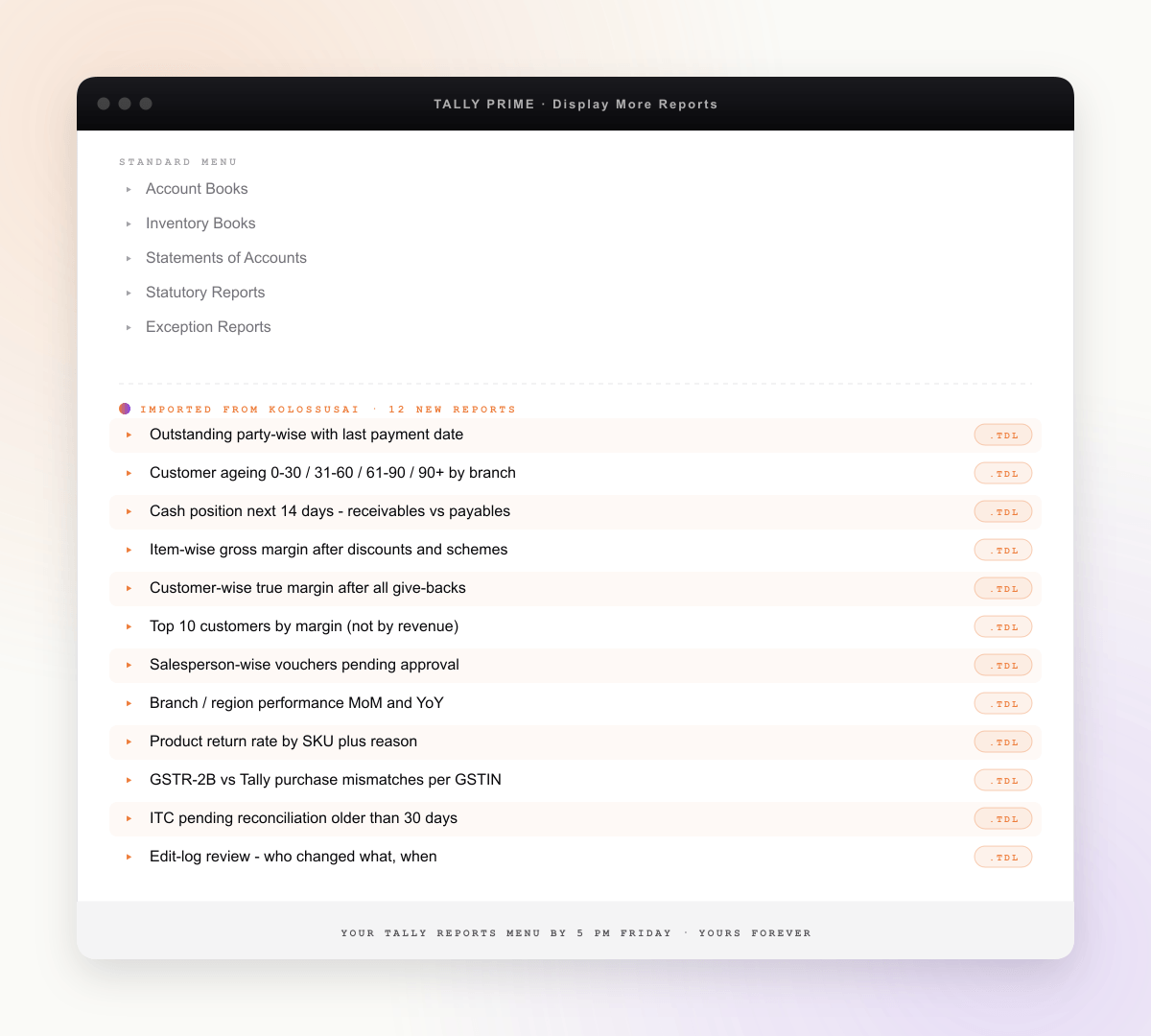
- Download the .tdl file. The AI writes the TDL definition for the report and gives you a downloadable .tdl. You import it into Tally Prime or Tally.ERP 9, and the report appears in your Tally menu for anyone on your team to run, offline, forever.
Total elapsed time from naming the report to having it live in your Tally menu: about 10 minutes per report. No developer call. No two-week wait. No ₹25,000 invoice. The same artifact a developer would deliver, produced the same afternoon you thought of the question.
The 12 reports
Grouped by function. Each report gets the plain-English question you would type, the decision it unlocks, the cost today, and the cost with AI.
Receivables and cash
3 reportsPlain-English query: "Outstanding bills party-wise with the last payment date for each party". Unlocks the collections call list - who owes, how much, when they last paid. Today: ₹25K to ₹40K and 1 to 2 weeks. With AI: ₹0, 10 minutes, .tdl file in your Tally menu.
Plain-English query: "Ageing of outstanding receivables in four buckets, split by branch". Unlocks branch- level credit-policy enforcement and the "which branch is letting things slip" conversation. Today: ₹30K to ₹45K and 1 to 2 weeks. With AI: ₹0, 10 minutes, .tdl in your menu.
Plain-English query: "Expected receipts in the next 14 days minus vendor payments due in the same window". Unlocks short-cycle treasury decisions before you commit to a large vendor payment or capex. Today: ₹35K and almost always built in Excel because no developer wants to maintain it. With AI: ₹0, 10 minutes, and a Tally- native report that updates live.
Margin and profitability
3 reportsPlain-English query: "Item-wise gross margin for current quarter, netting volume discounts and scheme give-backs". Unlocks the pricing review - which SKUs look profitable on the rate card but bleed after schemes. Today: ₹35K to ₹50K and 2+ weeks because schemes need to be modelled. With AI: ₹0, 10 minutes, .tdl in your menu.
Plain-English query: "Customer-wise margin after discounts, schemes, and payment-term cost". Unlocks the uncomfortable conversation about which top-revenue customers are actually subsidised. Today: ₹40K and 2 weeks. With AI: ₹0, 10 minutes.
Plain-English query: "Top 10 customers ranked by margin this month, not revenue". Unlocks sales-team incentive conversations and the realisation that the largest revenue customer is not always the largest margin customer. Today: ₹25K. With AI: ₹0, 10 minutes.
Sales and operations
3 reportsPlain-English query: "Vouchers pending approval by salesperson, oldest first". Unlocks the daily sales-ops standup and stops vouchers ageing past their cycle. Today: ₹25K and a recurring developer call every time the approval workflow changes. With AI: ₹0, 10 minutes, .tdl that self-updates with the latest voucher state.
Plain-English query: "Branch-wise sales month-on-month and year- on-year comparison". Unlocks the Monday review with numbers leadership trusts. Today: ₹35K and 2 weeks. With AI: ₹0, 10 minutes.
Plain-English query: "Return rate by SKU with reason codes, last 90 days". Unlocks quality conversations with suppliers and stops bleeding margin on a handful of chronic SKUs. Today: ₹30K and 1 to 2 weeks. With AI: ₹0, 10 minutes.
GST and compliance
2 reportsPlain-English query: "GSTR-2B versus Tally purchase entries, list mismatches per GSTIN". Unlocks ITC protection before the GSTR-3B deadline. Today: usually done manually in Excel for 3 to 5 hours per GSTIN per month. With AI: ₹0, 10 minutes for the report itself, run monthly.
Plain-English query: "Input tax credit entries not reconciled in 30+ days, by vendor". Unlocks the vendor follow-up list for stuck invoices. Today: ₹25K to ₹35K. With AI: ₹0, 10 minutes.
Audit and control
1 reportPlain-English query: "Edit log of all voucher modifications between two dates, by user". Unlocks the "why did last month's number change after close" conversation and is the report your statutory auditor quietly hopes you have. Today: ₹25K and rarely built because audit reports do not feel urgent until they are. With AI: ₹0, 10 minutes, .tdl in your menu - run before every monthly close.
What the playbook looks like in one afternoon
The reason this lands harder than it should: the playbook runs end-to-end in a single sitting. Concrete narrative.
- 2:00 pm - Friday. Open KolossusAI on top of your live Tally. Type report 1 - outstanding by party with last payment date. Verify three rows against Tally. Download .tdl. Import into Tally. The report appears in your Tally menu.
- 2:15 pm. Report 2 - customer ageing by branch. Same flow. Done.
- 3:00 pm. Reports 3 to 6 - cash position, item margin, customer margin, top customers by margin. The pattern is now muscle memory.
- 4:00 pm. Reports 7 to 11 - sales ops, branch comparison, returns, GST mismatches, ITC ageing.
- 4:50 pm. Report 12 - edit-log review. The auditor report you wished you had last year.
- 5:00 pm. All 12 reports running live. All 12 .tdl files in your Tally menu. From next Friday onward, anyone on your team opens Tally, clicks the report, and the answer is there.
The afternoon ends with a permanent menu of 12 custom reports inside the Tally your team already uses every day. No developer was called. No invoice was raised. The decisions you have been making on gut for 18 months now have numbers behind them.
Why an AI-built TDL is structurally the same as what a developer hands you
Reasonable scepticism at this point: is the AI-generated TDL really the same thing a developer produces? Honest answer in three parts.
- Same file format. A TDL is a TDL. The AI writes valid Tally Definition Language - the same syntax, the same collections (Vouchers, Ledgers, BillAllocations, CostCentres), the same field references. When Tally imports the .tdl file, Tally does not know or care who wrote it.
- Same Tally menu placement. Once imported, the report appears in your Tally menu under the standard report tree, exactly where a developer- built report would appear. Your team uses it the same way they use any other Tally report.
- Same ownership and portability. The .tdl file is yours. You can keep it forever, share it across your group companies, archive it, edit it by hand if you ever want to. There is no remote kill-switch and no lock-in. If you stop using KolossusAI tomorrow, the 12 .tdl files in your Tally menu continue working.
The three things that differ from the developer workflow: plain English in (no TDL knowledge needed to author the request), live data out (verification against your real Tally before you import), and 10 minutes per report (instead of two weeks). The artifact is the same. The path to the artifact is different.
What this playbook does not cover (honest limits)
Worth being explicit about scope. Five categories of report this playbook does not solve.
- Reports needing data from your CRM - sales pipeline, lead-to-cash conversion, customer activity that lives outside Tally.
- Reports needing data from a separate ERP - production yield, BOM cost variance, shop-floor data that lives in a custom or off-the-shelf ERP.
- Reports needing data from inventory or warehouse modules separate from Tally - bin- level stock, multi-godown movement that lives in a standalone WMS.
- Reports needing project or RERA data from a construction or real-estate management system tracked outside Tally.
- Forecasting reports - this playbook describes what is, not what will be. Forecasting needs a separate modelling layer.
For all five, the deliverable inside KolossusAI is a live cross-system dashboard rather than a Tally .tdl file (since TDL is a Tally-internal format and cannot wrap non-Tally data). The workflow is otherwise identical - type the question in plain English, get the answer, drill back to source. The honest framing: 12-report playbook for everything that lives in Tally, live cross-system dashboards for everything that does not.
How KolossusAI fits
KolossusAI is the AI layer the playbook runs on. Three properties matter for owners evaluating it on top of their existing Tally.
- Native Tally Prime and Tally.ERP 9 support. Connects to both editions through the native Tally connector. Read by default, write-back opt-in per workflow. No migration.
- Plain-English in, .tdl out. For every Tally-internal report from the 12-report playbook above, the deliverable is a downloadable TDL file you import to your Tally menu permanently.
- Free 14-day POC on your real data. No credit card, no auto-billing. During the POC you can build the first three reports from this playbook live with a founder on the call.
See Custom Tally reports in 10 minutes for the full pitch and demo flow, or AI for Tally users for the technical depth on the connector and supported Tally versions. Pricing is a flat custom quote shaped by your team size and the systems you connect - not a per-report meter.
Conclusion
Every week these 12 reports go unanswered, decisions get made on gut and revised later when the number finally lands. The cost of that drift is invisible on the P&L but compounds quietly - in receivables left unfollowed for two weeks longer, in margin lost on SKUs nobody noticed were bleeding, in ITC stuck because nobody reconciled GSTR-2B before the deadline.
One afternoon ends that. 12 reports, 10 minutes each, a permanent Tally menu by 5 pm. The owner walks away with numbers behind the decisions they were already making. The cost of the developer-led workflow was never the ₹25K per report - it was the questions that never got asked because the cost was too high to bother.